Kids AI Drawing Printers: Product Guide and Market Opportunity for Retailers and Brands
How voice-to-colouring-page printers work, why parents like them, and the features, safety and privacy questions brands should settle before launching one.
Key takeaways
- A kids AI drawing printer turns a spoken idea into a printed colouring page. It is a creative, low-screen product that appeals to parents and gift buyers.
- The product lives or dies on content quality and content safety. Settle how prompts are filtered and what the AI can generate before you look at shell colours.
- Thermal printing keeps running costs low, but choose BPA-free paper and plan paper refills as a recurring revenue line.
- Connected models handle children's voice data, so privacy and security (COPPA, GDPR, EU RED cybersecurity) must be part of the design.
"Print a dinosaur riding a skateboard." A few seconds later, a black-and-white line drawing slides out of a small, toy-like printer, ready to colour. Kids AI drawing printers combine three mature technologies: speech recognition, generative image AI and thermal printing. Together they make a product that feels genuinely new to children and parents. For toy, stationery, educational and gift brands, it is a category worth understanding.
1. How the product works
- Voice capture: the child presses a button and speaks. A microphone and audio front-end capture the prompt.
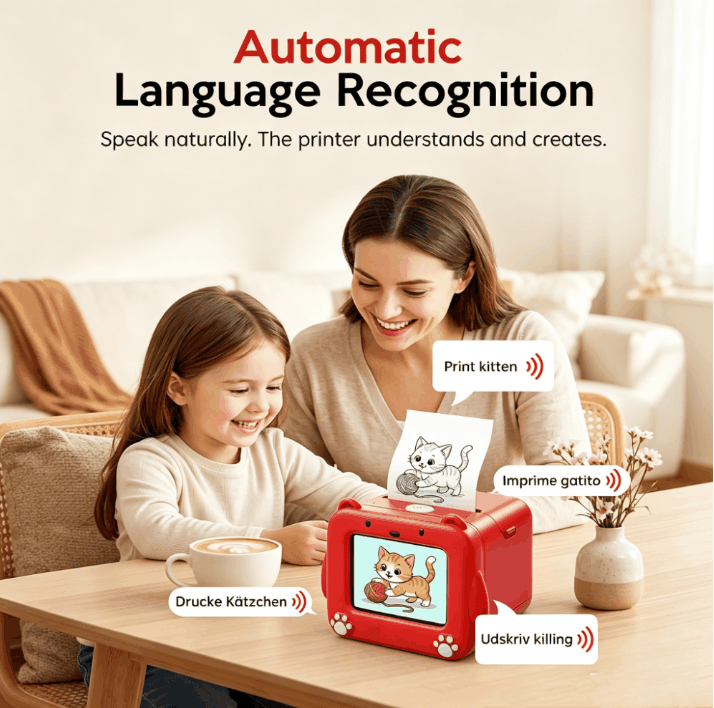
- Speech recognition: the speech is converted to text. Better systems detect the language automatically, so one product can serve multilingual households and multiple markets.
- Prompt safety: the text is checked against filters to block inappropriate requests.
- Image generation: an AI model creates an image in a colouring-book style, typically bold outlines with few greys.
- Line-art processing: the image is converted to black-and-white suited to thermal printing.
- Printing: a thermal print head prints onto heat-sensitive paper, with no ink involved.
Steps 2–5 can run in the cloud (via Wi-Fi), on the device, or a mix of both. That choice affects cost, speed, content flexibility and privacy obligations, so it's one of the first questions to ask a supplier.
2. Why parents and kids buy it
- Creative, not passive: the screen is a helper, and the output is paper to colour, cut and share.
- Language play: children practise describing things, and in multilingual families they can switch languages.
- Instant gratification: from idea to paper in seconds, which works well in short-video marketing.
- Low running cost: no ink cartridges, only paper rolls.
- Giftable: character design and packaging make it a natural birthday and holiday gift.
3. Features to compare
| Feature | Questions to ask |
|---|---|
| AI content quality | Are drawings recognisable and colourable? How consistent is the style? Test 50 real prompts from children. |
| Content safety | How are prompts filtered? Can the brand adjust the blocklist? What happens with ambiguous requests? |
| Languages | Which languages are recognised automatically? How accurate is it with children's voices and accents? |
| Connectivity | Cloud, on-device or hybrid? What works offline? Who runs and pays for the cloud service, and for how long? |
| Speed | Time from prompt to print, on a typical home Wi-Fi connection. |
| Screen and UI | Screen size, touch vs buttons, parental settings, character animation. |
| Print quality | Print width, darkness, and how long prints last (thermal prints fade with heat and light). |
| Paper | Roll size, availability, BPA/BPS-free options, price per roll. |
| Battery | Prints per charge, charging time, cell quality and certification. |
| Durability | Drop resistance, paper-door hinge, cutter safety. |
4. Content safety is the product
A single inappropriate drawing shared online can damage a children's brand. Before choosing a platform:
- Test with adversarial prompts (violence, adult themes, scary content) in every target language.
- Ask whether the AI model and filters can be updated after sale, and who is responsible for updates.
- Consider a curated mode, with a library of pre-approved drawings, for younger children or for retailers that require it.
- Decide what is stored: prompts, images, voice recordings. Keep it to the minimum.
5. Privacy and connected-device rules
A connected device that records children's voices is handling sensitive personal data. Key frameworks to discuss with your legal advisor:
- United States: COPPA regulates online services directed to children under 13, including verifiable parental consent and data minimisation. The FTC updated the COPPA Rule in 2025, with compliance required in 2026.
- EU and UK: GDPR, including stricter rules for children's data, and the UK Age Appropriate Design Code.
- EU cybersecurity: since 1 August 2025, internet-connected radio equipment, explicitly including toys and childcare equipment, must meet the RED cybersecurity requirements (harmonised standards EN 18031-1/-2/-3).
We cover physical safety and testing in our kids' electronics compliance guide.
6. Thermal paper: cost, safety and recurring revenue
Thermal printing needs no ink, but it needs the right paper. Some thermal papers use bisphenol developers. The EU has restricted BPA in thermal paper since January 2020, and many brands now specify BPA- and BPS-free papers for children's products. Paper is also a recurring revenue opportunity. Branded refill packs, coloured or sticker paper, and themed bundles keep customers coming back.
7. Channels and positioning
- Toy and gift retail: character-led design, strong packaging, clear age grading.
- Educational and stationery brands: learning modes (letters, animals, numbers), classroom bundles.
- E-commerce and social commerce: short videos of "say it, print it" moments convert well.
- Subscription: paper refills and themed content packs.
8. OEM and ODM options
Brands can customise the shell colour, character design, logo, packaging, UI language, voice prompts and the content library. Deeper projects can change the industrial design entirely. Because the AI service is part of the experience, agree in writing:
- Who operates the cloud service, where data is stored, and for how many years it is guaranteed.
- Whether the brand can customise prompts, filters and the style of generated art.
- How firmware and model updates are delivered and tested.
- Paper supply for the product's lifetime.
See our AI drawing printer page for the models we offer, and the OEM vs ODM guide for project structure.
9. Launch checklist
- Content quality and safety tested with real children's prompts in each language.
- Privacy design reviewed: data stored, retention, parental controls, consent flow.
- Electrical, radio, toy-safety and chemical testing planned for each market.
- BPA/BPS-free paper specified; refill SKUs ready.
- Packaging with age grading, warnings and the required importer/responsible-person information.
- After-sales plan: paper availability, firmware updates, customer support scripts.
10. Pricing tiers and what customers expect
| Tier | Typical features | Positioning |
|---|---|---|
| Entry | Buttons, small screen, curated drawing library, limited AI or cloud features | Impulse gift, younger children |
| Mid | Voice AI generation, colour screen, character UI, rechargeable | Mainstream gift and e-commerce |
| Premium | Larger touchscreen, more AI modes (stickers, learning cards), parental app, premium design | Educational positioning, specialty retail |
Whatever the tier, parents judge value by how often the child uses it after the first week. Content variety, ease of use and paper cost drive that more than specs do.
11. Content modes that extend engagement
- Colouring pages: the core use, from any spoken idea.
- Stickers: printing on sticker paper rolls for decorating notebooks.
- Learning cards: letters, numbers, animals, vocabulary in several languages.
- Story mode: a short illustrated story printed panel by panel.
- Puzzles and mazes: generated activity sheets for quiet time.
- Seasonal packs: holiday themes that encourage paper refill purchases.
Brands can differentiate with their own characters and content libraries, while keeping the same proven hardware platform.
12. Marketing that works for this category
- Short videos showing the "say it, print it" moment, with a child's real reaction.
- Side-by-side "screen time vs creative time" messaging for parents.
- Unboxing videos that show the character design and packaging.
- User-generated content: coloured drawings shared by parents, with permission.
- Teacher and homeschool use cases for educational positioning.
Make sure every marketing claim about safety, privacy or educational value is backed by your testing and design documentation.
Frequently asked questions
Does a kids AI drawing printer need Wi-Fi?
It depends on the design. Many models use cloud AI for image generation and therefore need Wi-Fi. Some offer on-device or offline modes with a built-in library of drawings. Ask the supplier which features work offline.
Is thermal paper safe for children?
Choose BPA-free, preferably BPS-free, thermal paper for children's products. The EU restricts BPA in thermal paper, and many brands go further, using phenol-free papers to address parent concerns.
Can the AI generate inappropriate images?
Any generative system needs filtering. Good products combine prompt filters, style constraints and output checks, and they allow updates after launch. Test extensively in every language before selling.
Can I customise the characters and content?
Yes. OEM projects commonly customise the device character, UI language, voice prompts, colours, packaging and the curated drawing library. Deeper changes to AI style are possible depending on the platform.
Talk to a factory engineer
Send us your target market, quantity and customization needs — we reply with a quotation, sample plan and certification checklist within 24 hours.
Request a Quote Browse Products